Rent a trading strategy!
100% automated strategies compatible with NinjaTrader 8 – ES and NQ futures. Monthly, cancel any time.
No payment details. Register now – strategies are delivered from 9 November 2026.
Trades on video (NinjaTrader Sim)
SRzona · latest trades · NinjaTrader Sim · selected examples, not representative
More videos in ResultsAll videos on YouTubeThe video loads from YouTube only after you click.
Choose a strategy
How it works
- Choose a strategyCompare the results by month, losing months included.
- RegisterE-mail and NinjaTrader Machine ID. No payment details for the trial.
- Run it in NinjaTrader 8On a Sim, prop or live account – step-by-step guide.
New: 10 trading days free (about 2 weeks) – try it, then decide
Any of our four strategies. No payment details; strategies are delivered from 9 November 2026.
Free trial conditionsProp account: Boxcar or BluSky
- Both firms allow our strategies
- Boxcar discount code STRATEGYRENTAL (affiliate link)
Other prop firms may ban our strategies – check their rules.
More details
Both prop firms allow our strategies on their prop accounts – you choose. At Boxcar Trading use the discount code STRATEGYRENTAL (affiliate link – we earn a commission). See which plan fits which strategy.
Careful with other prop firms: some prohibit automated trading or several people using the same strategy, and for a rule violation they can block your account or refuse a payout. Before you start, check the rules directly with your prop firm. Boxcar Trading and BluSky allow our strategies.
Free: 6 indicators for NinjaTrader 8
Try SRzona free and you also get VWAP Bands, Market Sessions, Footprint, Big Trades, News Timer and Prop Account Monitor – no purchase needed.
Trading futures involves substantial risk of loss and is not suitable for every investor. Nothing on this site is investment advice.
Strategies
Each strategy states the markets and sessions it was built for and every setting you can change. The signal logic itself stays closed. Only strategies whose test has been verified are for rent.
Hypothetical results of a historical test on tick data — not live trading. Past results are no guarantee of future results.
6 free indicators for NinjaTrader 8
Try SRzona free for 10 trading days and you get all 6 indicators – no purchase needed. New customers, no payment details.
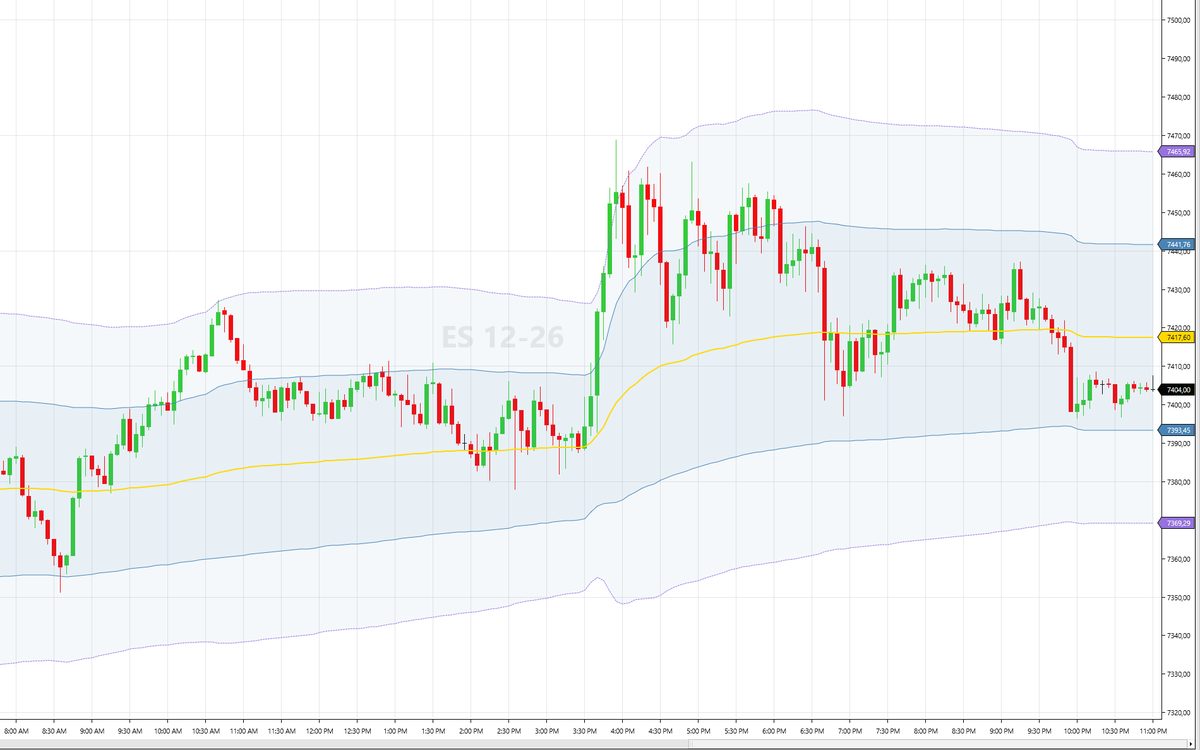
VWAP Bands
Anchored VWAP with standard-deviation bands.
- Session, week or month anchor
- Bands at 1, 2 and 3 standard deviations
- Prior period VWAP and shaded zones
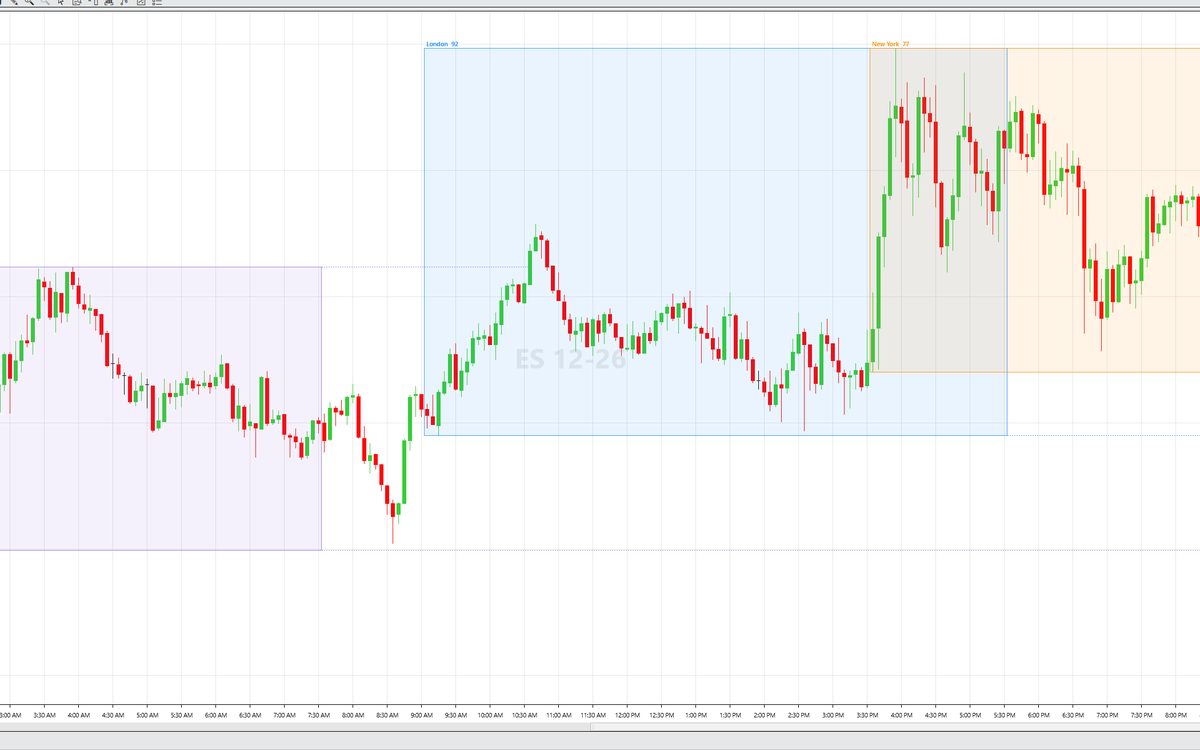
Market Sessions
Asia, London and New York sessions as boxes on your chart.
- Each session in its own time zone, daylight saving time included
- Session high and low extended until price touches them
- Session range in points
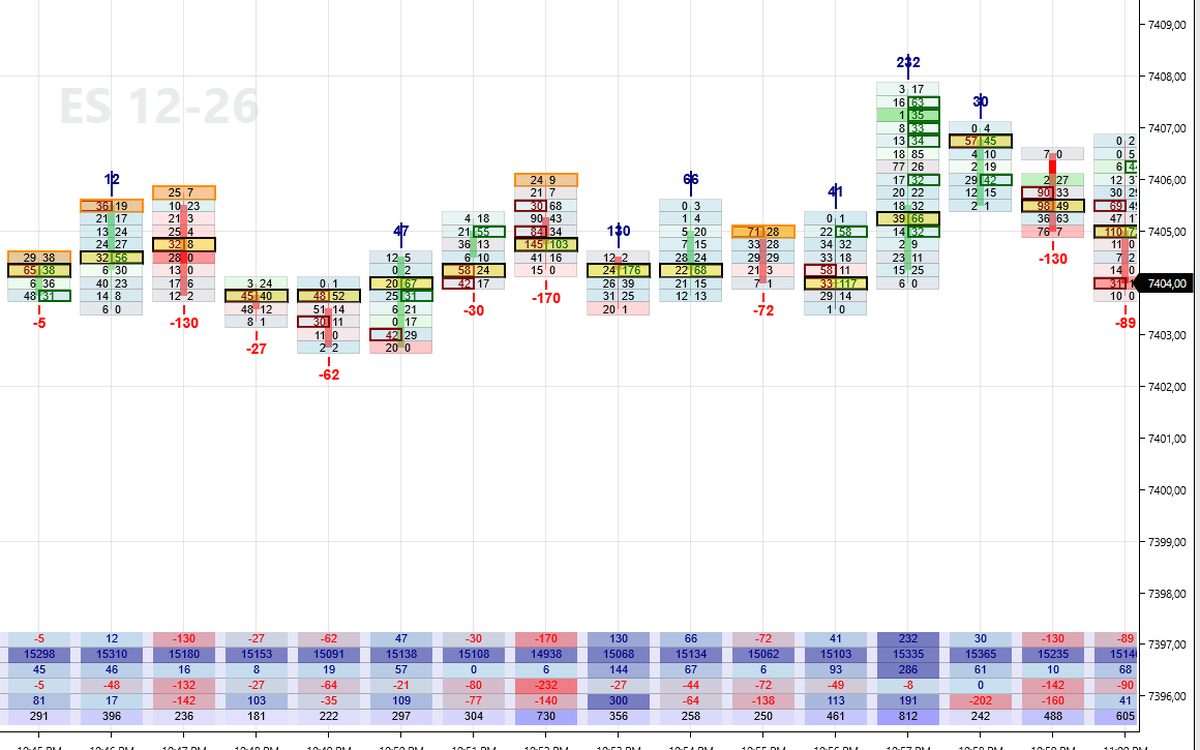
Footprint
Bid × ask volume at every price inside each bar.
- POC of each bar, imbalances, unfinished auctions
- Delta, cumulative delta, max / min delta, volume
- Session volume histogram
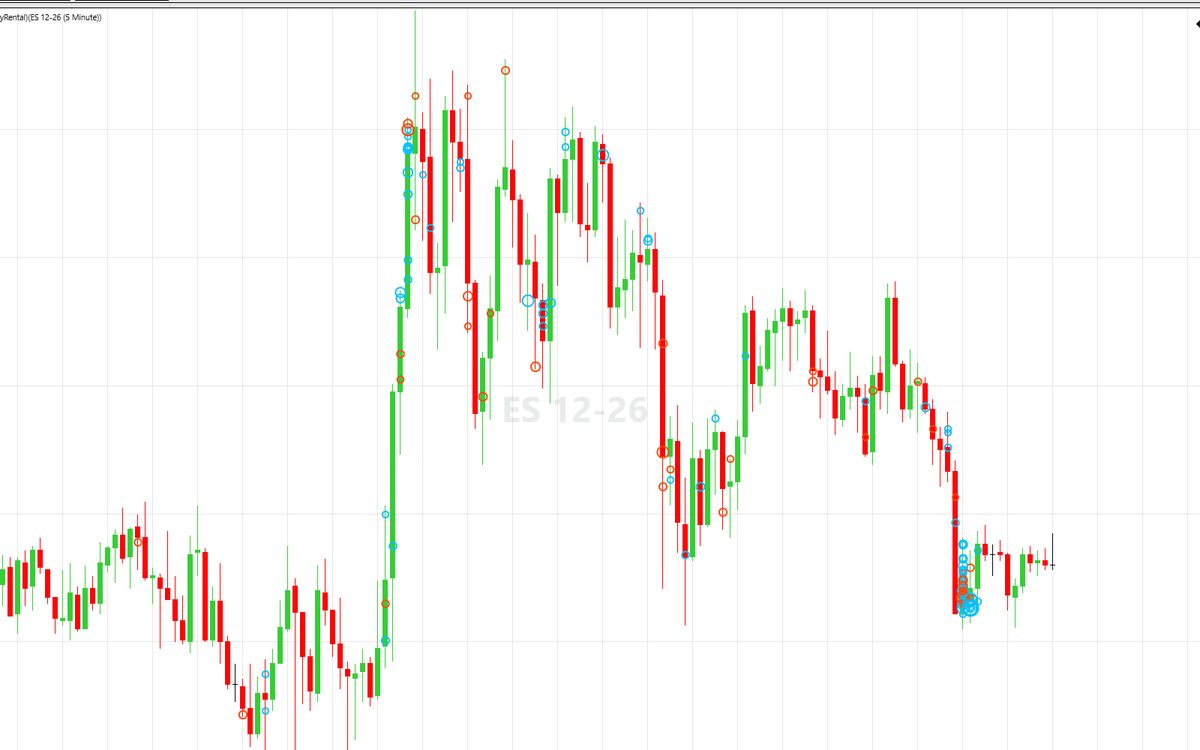
Big Trades
Large aggressive orders shown as bubbles.
- Prints with the same time stamp joined into one order
- Adaptive or fixed size threshold
- Absorption outline
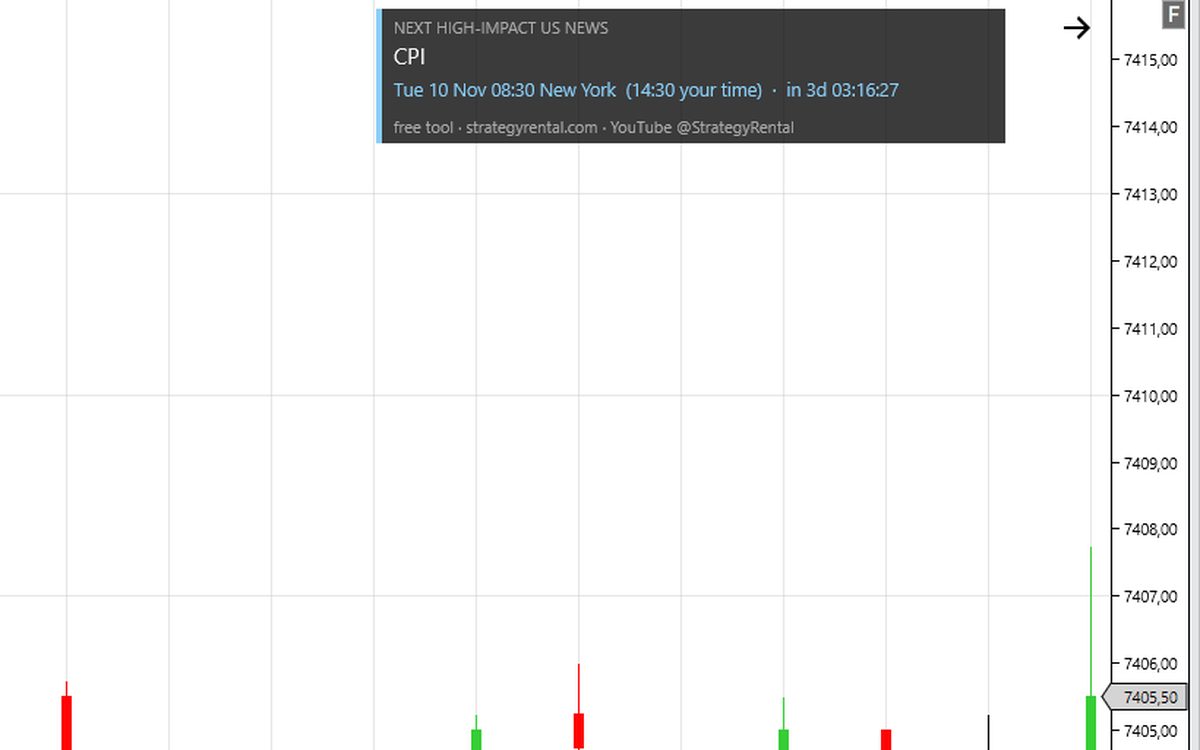
News Timer
Countdown to the next high-impact US news release.
- New York time and your local time
- News windows shaded on the chart
- Optional sound alert before the release
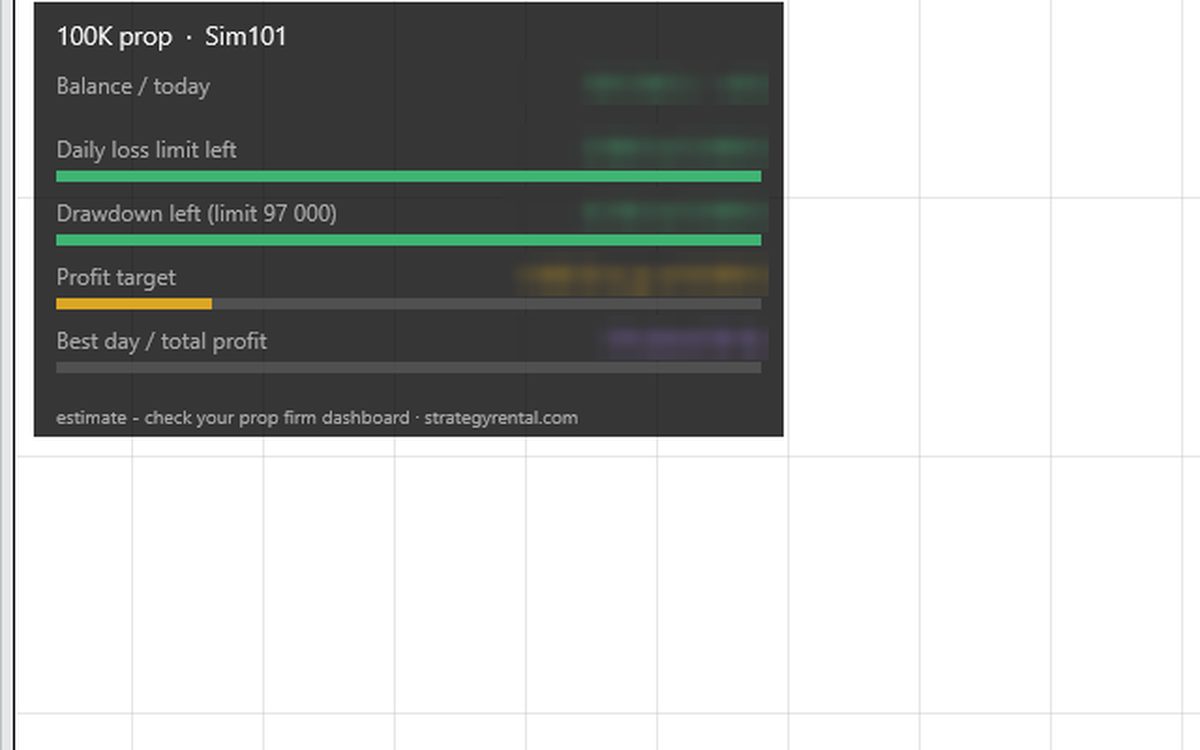
Prop Account Monitor
The rules of your prop account at a glance.
- Daily loss limit and drawdown left
- Distance to the profit target
- Consistency rule: best day vs. total profit
VWAP Bands, Market Sessions, Footprint, Big Trades and Prop Account Monitor keep working for 12 months after your trial or rental ends. News Timer has no time limit.
How to get them
- Register for the free trial of SRzona (10 trading days).
- Together with the strategy you receive the indicator package and your licence file.
- Import it into NinjaTrader 8 (Tools → Import → NinjaScript Add-On) and add the indicators to your chart.
Footprint and Big Trades need Tick Replay enabled in NinjaTrader 8.
Prop Account Monitor shows an estimate – always check your prop firm dashboard. The example runs on a Sim account; its values are hidden.
Try SRzona freeSoftware for chart analysis only. Not investment advice. Futures trading involves substantial risk of loss and is not suitable for every investor.
Pricing
The price is per strategy. Each one has a limited number of seats — when they are taken, the next customer waits for one to come free.
Try it free for 10 trading days
- 10 trading days free for new customers
- Any of the four strategies – you pick one
- Sim account or prop account – your choice
No payment details. Register now – strategies are delivered from 9 November 2026.
More details
For new customers: 10 trading days (two trading weeks) free, counted from the day of your registration – register whenever it suits you. Only our strategy is free; you trade on your own account.
The trial applies to all four strategies – you choose one. We recommend SRzona (ES) for the trial.
Registration is open now. Strategies are delivered from Monday 9 November 2026 – if you register before then, your 10 trading days start on 9 November.
- You decide where to run it: on a NinjaTrader Sim account, on a prop account (Boxcar Trading or BluSky), or both – for example 4 days on Sim and then 6 days on a prop account.
- The prop account is not part of the trial – you buy it yourself from the prop firm (at Boxcar with the discount code STRATEGYRENTAL – an affiliate link, we earn a commission).
- One trial per customer, bound to your e-mail address and your NinjaTrader Machine ID. Not for renewals.
- No payment details are needed. When the trial ends, the strategy stops; if you like it, order a paid month and continue.
- Trial places count towards the limited seats of each strategy.
Offer for new customers, valid at least until 31 December 2026. While all seats of a strategy are taken, new trials for it wait for a free seat.
SRzona
for the first 3 months, then 199 € / month – cancel any time.
Each additional account (e.g. a second prop account): 49 € / month for the first 3 months, then 99 € / month.
Boxcar vs BluSky – which prop firm for SRzona? (comparison)
More details
Trades price reactions at support and resistance zones on ES across several timeframes. Fixed stop and target; the zones and timing are set by the strategy. One mode – nothing to set.
5 seats on live accounts. On prop firm accounts (Boxcar, BluSky) the number of traders is not limited – their accounts are simulated and take no live seats.
Billed every month.
Range Breakout
for the first 3 months, then 199 € / month – cancel any time.
Risky mode: drawdown of up to 8,207 $ in 2025.
More details
Choose the Conservative or the Risky mode yourself. To switch, disable the strategy, change the mode and enable it again.
Risky mode: in 2026 the largest drawdown was 1,702 $ (1 ES contract), but in 2025 the same mode lost 5,297 $ with a drawdown of up to 8,207 $. The market can return to 2025-like conditions at any time — size your account for the 2025 drawdown, not the 2026 one.
5 seats in total (both modes together).
Billed every month.
Trend Pullback NQ
for the first 3 months, then 199 € / month – cancel any time.
More details
7 seats. More only after we have measured the real slippage of the first customers.
Billed every month.
Euro Open NQ
for the first 3 months, then 199 € / month – cancel any time.
More details
7 seats. More only after we have measured the real slippage of the first customers.
Billed every month.
- Updates and e-mail support included
- 2 days to install and test before the paid month starts
- Cancel any time – the licence ends with the paid month
Why there are so few seats
Every customer's order goes to the same price at the same moment, so nobody gets a worse price than anybody else. But the more orders queue at that price, the fewer of them are actually filled — and the ones at the back of the queue tend to fill on the occasions when price pushes straight through the level. The seat count is set so the strategy still works for the last customer in the queue, not so that as many licences as possible get sold.
Trade it on a prop account: Boxcar Trading
| Strategy | Recommended program |
|---|---|
| SRzona ES | BoxcarFlex 50K |
| Range Breakout ES | BoxcarPrime 50K BoxcarFlex 50K |
| Trend Pullback NQ NQ | BoxcarPrime 150K |
| Euro Open NQ NQ | BoxcarFlex 150K BoxcarPrime 150K |
Recommendation based on simulations on past data – the final choice is yours.
Affiliate link: we earn a commission if you buy through the Boxcar link or with the discount code STRATEGYRENTAL.
Boxcar Trading plansMore details
Boxcar Trading allows our strategies on its prop accounts.
- Works on evaluation and funded accounts, also with Boxcar's free VPS.
- NinjaTrader licence and bid/ask data are included.
- Only in the BoxcarPayout plan must the funded account be flat from 1 minute before to 1 minute after high-impact US news – so for our strategies we recommend BoxcarFlex or BoxcarPrime, which have no such rule.
Current prices at boxcartrading.com. Passing an evaluation is not guaranteed. Boxcar Trading is an independent company.
Second prop firm: BluSky Trading
| Strategy | Recommended program |
|---|---|
| SRzona ES | BluSky Launch 50K |
Recommendation based on simulations on past data – the final choice is yours.
Check that your country is allowed
BluSky Trading plansMore details
BluSky Trading also allows our strategies on its prop accounts – you choose the firm that suits you. Main conditions:
- Each trader runs the strategy on their own computer or VPS – never shared between people.
- NinjaTrader 8 via the Rithmic connection.
- No copy trading between accounts and no hedging – follow BluSky's ethical trading and conduct policy.
- Check whether your country is allowed on help.blusky.pro (for example Russia, Romania, Slovenia and Croatia are not).
Recommended at BluSky (from simulations on past data): SRzona (ES) – Launch 50K. The final choice is yours.
BluSky Trading is an independent company in the USA. This is not an affiliate link – we earn nothing from it. Passing an evaluation is not guaranteed.
Other prop firms may ban our strategies – check their rules.
More details
Careful with other prop firms: some prohibit automated trading or several people using the same strategy, and for a rule violation they can block your account or refuse a payout. Before you start, check the rules directly with your prop firm. Boxcar Trading and BluSky allow our strategies.
Results
For each strategy: the tested period, number of trades, win rate, net profit and maximum drawdown — by year and by month.
Drawdown = the largest drop from a peak within that period (each period starts at zero).
With all seats taken (5 for Range Breakout, 7 each for Trend Pullback NQ and Euro Open NQ), expect a lower result because of worse fills: roughly −165 $ (Conservative mode), −50 $ (Risky mode), −250 $ (Trend Pullback NQ) and −300 $ (Euro Open NQ) per month.
Hypothetical and backtested results have inherent limitations. Live results differ because of slippage, partial fills, latency and gaps. Past performance does not indicate future results. Trading futures carries substantial risk of loss.
CFTC RULE 4.41 / NFA RULE 2-29(c): HYPOTHETICAL OR SIMULATED PERFORMANCE RESULTS HAVE CERTAIN LIMITATIONS. UNLIKE AN ACTUAL PERFORMANCE RECORD, SIMULATED RESULTS DO NOT REPRESENT ACTUAL TRADING. ALSO, SINCE THE TRADES HAVE NOT BEEN EXECUTED, THE RESULTS MAY HAVE UNDER-OR-OVER COMPENSATED FOR THE IMPACT, IF ANY, OF CERTAIN MARKET FACTORS, SUCH AS LACK OF LIQUIDITY. SIMULATED TRADING PROGRAMS IN GENERAL ARE ALSO SUBJECT TO THE FACT THAT THEY ARE DESIGNED WITH THE BENEFIT OF HINDSIGHT. NO REPRESENTATION IS BEING MADE THAT ANY ACCOUNT WILL OR IS LIKELY TO ACHIEVE PROFIT OR LOSSES SIMILAR TO THOSE SHOWN.
Setup guide
About 15 minutes. The paid month starts only after 2 days for installation and testing.
What you need
NinjaTrader 8 (version 8.1.6.2 or newer), a market data connection with historical tick data, and a Windows computer that stays on while your strategy trades (exact times are in the manual you receive with the licence) — switch off sleep mode.
Time: the strategies work in New York time and convert it automatically from your NinjaTrader time zone (Tools → Options → General), including the clock changes in Europe and the USA – you do not need to set or change anything. Just keep the Windows clock correct (turn on “Set time automatically”). The chart shows: “Times: New York, automatic”.
Save the files we send you
After payment we e-mail you the strategy (a .zip file) and your licence file. Save the licence, without renaming it, straight into the folder Documents\NinjaTrader 8. For Range Breakout we also send NEWS_CALENDAR.txt with the times of major US economic releases — save it into the same folder.
The licence and the news calendar go directly into Documents\NinjaTrader 8, not into a subfolder. Import the strategy
In the NinjaTrader Control Center choose Tools → Import → NinjaScript Add-On…, select the .zip file and confirm. Do not unzip it first.

Control Center: Tools → Import → NinjaScript Add-On… Chart for Range Breakout
New → Chart. Instrument: ES, the current contract (for example ES 12-26). Type: Minute, Value: 1. Tick Replay: on. Load data based on: Days, Days to load: 15 (at least 10 — the strategy needs the whole previous week). If you don't see Tick Replay, turn on Tools → Options → Market data → Show Tick Replay.

Data series for Range Breakout Chart for Trend Pullback NQ
New → Chart. Instrument: NQ, the current contract. Type: Tick, Value: 1. Tick Replay: on. Days to load: 15. Your data connection must provide historical ticks with bid and ask. Enable the strategy before 9:30 New York time (15:30 in Central Europe for most of the year).

Data series for Trend Pullback NQ Chart for Euro Open NQ
New → Chart. Instrument: NQ, the current contract. Type: Minute, Value: 1. Trading hours: CME US Index Futures ETH. Days to load: 5. Tick Replay is not needed. Keep the computer on during the European morning; the exact times are in the manual you receive with the licence.

Data series for Euro Open NQ Add and enable the strategy
Right-click the chart → Strategies…, select the strategy and click Add. Choose the Account; for Range Breakout also the Mode: Conservative or Risky. The number of contracts comes from your licence — there is nothing to set. Tick Enabled and confirm with OK. To change the mode later, disable the strategy, change Mode and enable it again.
Strategy settings for Range Breakout Account settings (required)
In the strategy settings, group Account (required): choose Where do you trade? (Simulation, PropFirm or LiveBroker), for a prop firm you may type its name, and tick I agree: report the account type to StrategyRental. Without this the strategy opens no trades and says so on the chart. Seats on live and prop firm accounts are limited – when they are all taken, the strategy shows it on the chart and opens no new trades (an open trade finishes normally).
Test for 2 days
Let the strategy run on a Sim account (for example Sim101) or live — your choice. Check that its orders appear on the chart and that the number of contracts and the mode match your order. The paid month starts after these 2 days.
Check that it is running
The bottom-left corner of the chart shows your licence: e-mail, valid-until date and the number of contracts (Range Breakout also the mode). If the licence is missing or belongs to another computer, the strategy does not trade and shows this computer's Machine ID. In the Control Center, Strategies tab, the strategy is ticked as Enabled; if that box is yellow, it is waiting until the account is flat. Messages from the strategy appear in New → NinjaScript Output.
The licence line in the bottom-left corner of the chart Disconnects and restarts
A short loss of connection is handled and the strategy keeps running. After you restart NinjaTrader, open the chart and enable the strategy again; it starts trading once the account is flat. Never run two copies of the same strategy on one account. On the contract roll date, switch the chart to the new contract.
Need help?
Write to us and attach a screenshot of the chart and of the NinjaScript Output window. We will reply by e-mail.
NinjaTrader 8

All our strategies are add-ons for the NinjaTrader 8 trading platform. They run on your own computer inside your NinjaTrader – we never have access to your account or your money.
- NinjaTrader 8 is free to download
- Windows PC + market data with historical ticks
- Installation in about 15 minutes
More details
- NinjaTrader 8 can be downloaded free of charge. For live trading you need a NinjaTrader licence, or an account at a broker or prop firm that includes it (Boxcar Trading includes it).
- You also need a market data connection with historical tick data and a Windows computer that stays on while the strategy trades.
- Installation: Tools → Import → NinjaScript Add-On, then add the strategy to a chart – step by step on the Installation page.
The NinjaTrader link is an affiliate link. NinjaTrader® is a registered trademark of NinjaTrader Group, LLC. Our strategies are independent products of StrategyRental.
Frequently asked
Risks
Please read this before you order.
This is software, not advice. You are not being told what or when to trade. You get a tool that you run on your own account, under your own control. The trading decision is yours.
We do not manage your account and have no access to it. We do not know what capital, broker or settings you will run the strategy with.
Trading futures carries a substantial risk of loss, including losses greater than your deposit. Most accounts in this kind of trading end up losing money.
No result is guaranteed. The figures published here are backtests and are described as backtests. Live results will differ.
We never ask for the login details to your trading account. We have no access to your account or your money, and we do not manage any funds.
We do not give individual recommendations or signals. The offer is not intended for persons resident or established in the United States.
Hypothetical and backtested results have inherent limitations. Live results differ because of slippage, partial fills, latency and gaps. Past performance does not indicate future results. Trading futures carries substantial risk of loss.
CFTC RULE 4.41 / NFA RULE 2-29(c): HYPOTHETICAL OR SIMULATED PERFORMANCE RESULTS HAVE CERTAIN LIMITATIONS. UNLIKE AN ACTUAL PERFORMANCE RECORD, SIMULATED RESULTS DO NOT REPRESENT ACTUAL TRADING. ALSO, SINCE THE TRADES HAVE NOT BEEN EXECUTED, THE RESULTS MAY HAVE UNDER-OR-OVER COMPENSATED FOR THE IMPACT, IF ANY, OF CERTAIN MARKET FACTORS, SUCH AS LACK OF LIQUIDITY. SIMULATED TRADING PROGRAMS IN GENERAL ARE ALSO SUBJECT TO THE FACT THAT THEY ARE DESIGNED WITH THE BENEFIT OF HINDSIGHT. NO REPRESENTATION IS BEING MADE THAT ANY ACCOUNT WILL OR IS LIKELY TO ACHIEVE PROFIT OR LOSSES SIMILAR TO THOSE SHOWN.
Contact
Questions before you subscribe, or trouble activating — write to us.
YouTube
Seller: Mario Rabik, Potočky 4282, 020 01 Púchov, Slovakia, e-mail info@strategyrental.com, phone +421 905 593 976 — a private individual and author, publishing as MaRa.
Order
Fill in the form and send it. You will get an e-mail with a link to confirm the order; then we send the payment details and, once the payment arrives, the strategy and the licence (with the free trial, the strategy right away).
Terms and conditions
This text is available in Slovak (binding version) and English.
Privacy policy
This text is available in Slovak (binding version) and English.